OVERVIEW
Happy Gut is a recipe app dedicated to promoting healthy home cooking. The app offers a detailed onboarding experience where users can set personal preferences and health goals. Based on the onboarding, it will curate personalized recipe feed and recommend recipes based on users' dietary preferences and goals. To make healthy eating more intuitive and fun, I incorporated an element of habit tracking, through a feature called "My Tracker." Users can also schedule recipes in their calendar and plan their meals ahead of time, making home cooking easier than ever.
My Role
Product Design, UI Design
Duration
Sep - Nov 2023 (80 hours)
Tools
Figma, Miro, Optimal Workshop
Key Skills
UX Research, Card Sorting, Ideation, Information Architecture, Wireframing, Prototyping, Usability Testing
PROBLEM
Research from Statista suggested that there's been a notable surge in home cooking since the pandemic. Despite the change in cooking habits, more people are experiencing difficulties with cooking healthy food.
RESEARCH
Understanding the market
As people enter the workforce, one of the most common challenges found online was cooking meals at home while working demanding jobs. Working professionals often desired to eat healthier, but found it difficult to juggle with other responsibilities. Main deterrents to cooking found online were lack of time, difficulty forming a good habit, and not knowing where to start.
"Shopping for ingredients and not knowing what to buy is frustrating. Often I get sidetracked when groceries shopping." - Quora


INTERVIEWS
Gathering data through user interviews
I conducted 4 moderated interviews with participants interested in cooking more often. One of the interviews were conducted in a form of contextual inquiry, where I interviewed the participant at her place while she was cooking. I addressed the topics below during the interviews and the questions were phrased as open-ended questions.
USER INSIGHTS
Key findings from affinity mapping
Through affinity mapping, I was able to group together similar opinions and results. Based on the interviews, There were 4 main topics users mentioned the most listed below.
01 Preferences
Most participants indicated they had some kind of dietary restrictions or preferences.
02 Time
All participants mentioned time is the most important factor when deciding what to cook.
03 Food Habits
75% mentioned they have some food or health-related routines.
04 Attitude
All participants unanimously expressed their desire of wanting to cook more healthy, balanced meals.
DEFINING THE PROBLEM
After synthesizing research findings and insights from interviews, I honed my focus with targeted How Might We questions. I came up with several questions, and decided to focus on the ones below.
How might we help users eat according to their health conditions?
How might we help users track their eating habits and achieve their health goals?
How might we support user to discover healthy recipes that are quick and easy to make?
TARGET USERS
Who am I designing for?
Using the data from user interviews and secondary research, I created 2 personas that combined many qualities of my interview participants. These 2 archetypes capture the needs and pain points of the different types of users.

1. The Eager Learner
Behaviors: Has the desire to eat healthier but lacks the basic cooking skills. Out of all the places, the kitchen is not where he feels confident.
Dietary notes: Meat lover, doesn't eat enough vegetables.
Needs: Wants to stick to a consistent meal prep routine.
Goals & Motivations: Learn how to cook at least 3 different recipes that he can use to meal prep.

2. The Master Chef
Behaviors: Cooks often, but only sticks to recipes she knows. Chooses recipes that taste good, but she doesn't account for nutritional value.
Dietary notes: Pescatarian. Tries to avoid food that causes inflammation.
Needs: Wants to cook more efficiently. Doesn't know what exactly constitutes as "healthy eating."
Goals & Motivations: Learn how to cook new healthy recipes to expand her menu. Cook recipes that are customized to her health condition.
FEATURE PRIORITIZATION
Narrowing down the scope by prioritizing key features
At this stage, I decided to prioritize key features based on the combination of research, qualitative insights, and synthesis from user personas. You can see which feature ideas correspond to the key insights from user research. Some of the feature ideas were deprioritized through this process. You can view the details of the process down below.
01. Cooking time as the most important factor

Recipe filters
Give users more flexibility to refine their search based on time it takes to cook certain recipes.
Setting goals in onboarding
Allow users to choose their goals for using the app during onboarding. Users can choose "save time" as their primary goal, which will help the algorithm to suggest relevant recipes.
02. Having dietary preferences
Onboarding customization
Before users start using the app, encourage users to go through the onboarding experience where they can set custom settings for dietary restrictions, preferences, etc.
Customized recipe feed
Based on the user's onboarding customization, the app will suggest personalized, relevant recipes on the user's feed.
03. Keeping track of food and health-related routines
"My Tracker" feature
Empower users to track their food/health-related habits and visualize progress for each habit.
SITE MAP
Developing structure with information architecture
Once I finalized the key features, I created a detailed site map to outline the app's structure. This visual representation of the site map not only established a clear information architecture but also served as a blueprint for the app's development.

USER JOURNEY
How would the user navigate through the app?
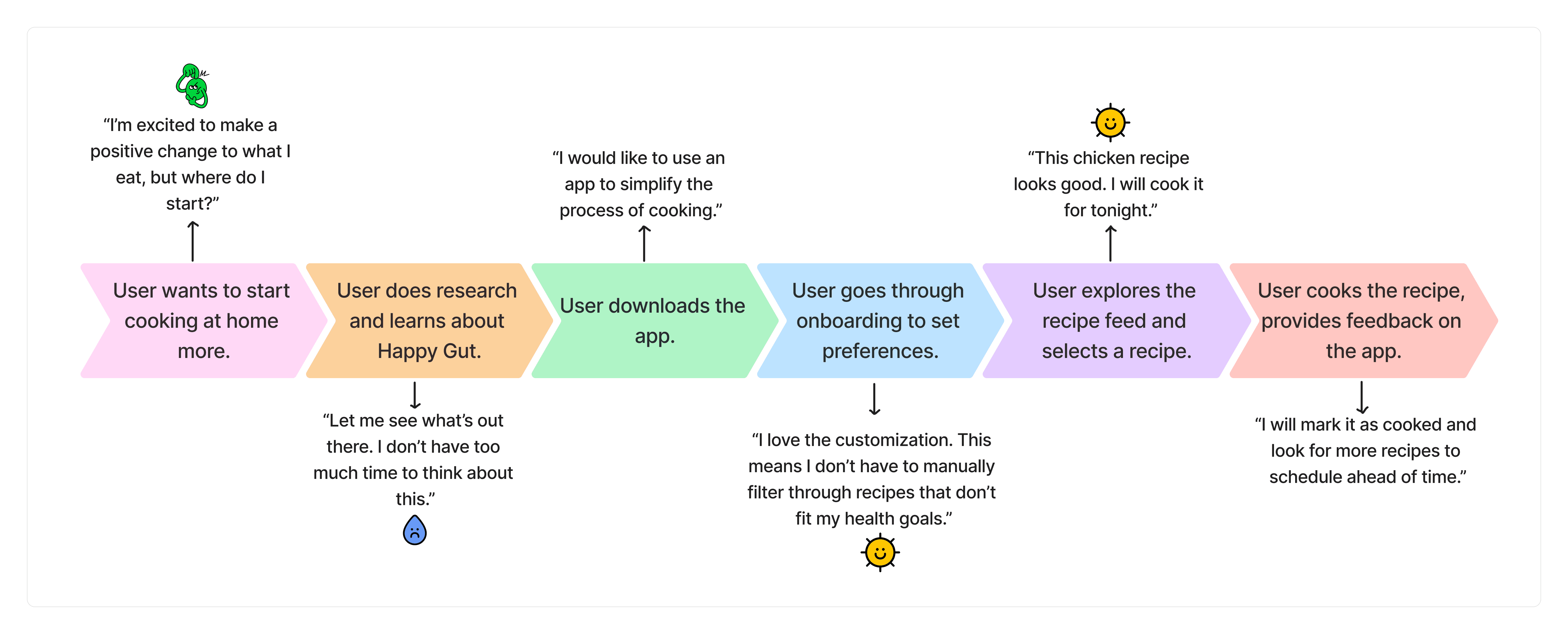
In conjunction to the site map, I crafted a user journey map to illustrate the overall navigation. This visual representation offered a cohesive sequence of steps users would undertake from beginning to end. By integrating both the site map and journey map, I gained more clarity and structure before progressing into the design phase.
3 primary task flows
I developed task flows for the three core functionalities, enabling a deeper comprehension of users' journey and the precise actions required within key areas of the app.

WIREFRAMES
Exploring with Low-Fi sketches
To craft low-fidelity wireframes, I referenced task flows and user journeys to pinpoint key features and components for each screen. I sketched rough wireframes using my iPad - at this stage, my focus was visualizing key components and simplicity. The initial sketches capture structure, contents, and various layout options.
After sketching various versions, I sought feedback from mentors and peers to refine wireframes into mid-fidelity. This process translated conceptual ideas into tangible designs, providing a roadmap for future development.
Solidifying the design with Mid-Fi wireframes


Expanding on the insights gained from the low-fi sketches, I created digital mid-fi wireframes for the key screens. Here, I enriched the designs with additional detail and introduced visuals to provide a more holistic impression of the app. While not yet polished to the level of high-fidelity wireframes, I ensured that these mid-fidelity versions encapsulated all core functionalities and key interactions and adequate for user testing.
UI DESIGN
Developing a style guide
I opted for green as the primary color to embody freshness, aligning with the brand's values. For the typeface, "SF Pro" was selected for its simplicity and readability, ensuring users can easily engage with recipes and other visual elements.

USER TEST
Identifying areas for iterations
Notably, some users found goals & habits interchangeable. This was a pivotal information, as I later on decided to simplify this tracker function to only tracking habits, completely eliminating the goal portion.

User 1
Onboarding
“How can I define which cooking level I am? This is a bit confusing because I don’t know what factors I should consider to know my cooking level.”

User 5
Goals & habits
“What’s the point of having both goals and habits? They seem to be overlapping and it's a bit confusing.”

User 3
Calendar
“In the recipe calendar, is there a way I can see all the ingredients for my scheduled recipes? I would like to see them at once, so I can plan out my groceries for the week.”
KEY ITERATIONS
Onboarding
Home (Feed)


Outcome
Provides more recipes that are directly connected to their personal health goals, which produced more impactful, personalized feed.
Added a new section
Added recipe recommendations based on users' goals they set during onboarding.
Users can easily switch between their goals to view relevant recipe suggestions.
Shows which filter is applied based on the tag "quick & easy."
Explore more with additional categories.
Filters


Outcome
Increased freedom & control for users.
Delivers more refined, specific search results.
Refined filter options
Recipe time was a critical factor in choosing a recipe. Now users can filter by time. Want to view "air fryer" recipes? Now you can!
Seasonal wasn't as popular. Instead, switched to "food type." Now users can easily sort by food group.
Added "meal type" for more specific search.
Recipe


Outcome
By re-ordering some information, recipe page provides more comprehensive information and clearer visual hierarchy.
Primary information
Social factors like ratings and reviews are more prominent on the top.
Consistent layout in buttons.
Included essential information such as nutritional values & ingredients.
Recipe Calendar


Outcome
More integrated use of the recipe calendar.
Increased user control & freedom.
Clarity on the calendar dates
Included indication on the circles on the calendar for better understanding.
Downloadable shopping list
Easily view & download the shopping list for scheduled recipes. (quote reference above)
Keep track of recipes
Quick summary of cooked & scheduled recipes.
My Tracker


Outcome
Simple, more intuitive use of "My Tracker" feature.
Minimized cognitive load for users.
More straightforward "add habit" button than before.
Narrowing down on habits
Some users found habits and goals confusing. Users mentioned habits seemed more trackable and relevant. (quote reference above)
I decided to focus on "habits" only.
FINAL DESIGN
One-stop recipe app that promotes efficiency, ease of use, and sparks joy of cooking
Happy Gut is your go-to recipe app designed to inspire home cooks from all walks of life. Our mission is to reignite the joy of cooking and simplify healthy eating for everyone. We're dedicated to enhancing your kitchen experience and providing virtual support on your journey to wellbeing.
Core features:
01. Customized recipe feed
02. Ability to schedule and plan recipes ahead of time
03. A feature that helps users track their dietary habits

TAKEAWAYS
Happy Gut was the first project where I took charge of the entire end-to-end design process. Through this case study, I honed my skills in navigating constraints, conducting moderated interviews, and extracting invaluable insights from research, all the way to ideating and delivering final solutions.
If I can do it again
Better to run user testing in the earlier part of the design phase.
If I were to approach this project again, I'd conduct user testing after mid-fidelity wireframes instead of waiting until high fidelity. Testing at this stage would have allowed for earlier adjustments, minimizing time and resources invested in the later phase of the project.
Focus on core features first, then add other features.
Looking back, I ideated very broadly to create an app that is more comprehensive and offers more than just one core functionality. While this was not a bad idea, I will hone in on one feature at a time in the future.
Next steps
Design for accessibility.
In the future, I'd consider adding a video feature to the recipe page to provide more viewing options for larger audience.
Incorporate elements of gamification.
I'd explore the integration of gamification elements to encourage users to cook and schedule more recipes, which could lead to higher user engagement and point of differentiation for the app.